


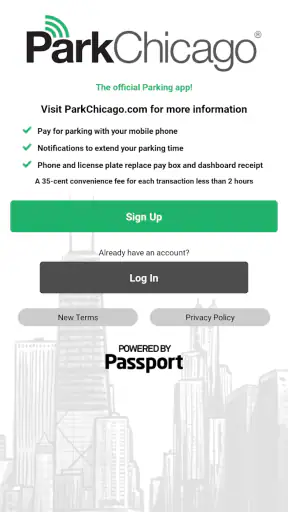
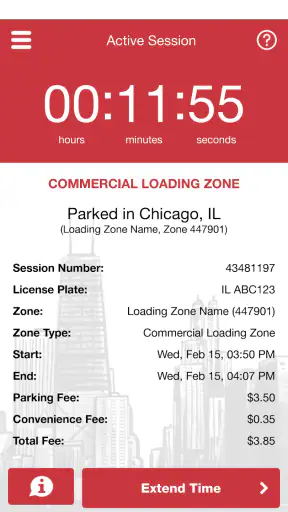
Parking in Chicago can turn a simple trip into a small planning exercise, especially when you are trying to leave the car legally without standing beside a meter searching for coins. I tested ParkChicago® as a practical parking companion rather than treating it like a general navigation tool, and that distinction matters. It is the official parking app from Chicago Parking Meters, LLC., built for paying for eligible street parking and managing a session from a phone. If your regular journeys bring you into areas covered by the Chicago parking system, it can remove a surprisingly annoying part of the trip.
The app is free, rated for Everyone, and sits in the Maps & Navigation category. Its store presence is substantial, with more than a million installs and a 4.6 average from about 21 thousand ratings, alongside roughly 5.7 thousand written reviews. Those figures suggest that it is not a niche experiment, but popularity alone does not make every parking app convenient for every driver. The useful question is whether its focused approach matches the way you park.
How I judged it as a parking decision
I looked at it through four practical questions: can I start a parking session without unnecessary confusion, can I manage the session after walking away from the car, does it reduce the risk of an avoidable parking mistake, and is it more useful than the alternatives I already carry on my phone? A city map may help me find a destination, while a payment app may handle a transaction, but a dedicated municipal parking app has a narrower job. That narrowness can be its biggest strength and its biggest limitation.
The first thing I would decide is whether I frequently park in Chicago spaces supported by the service. If the answer is yes, the app has a clear purpose. If I only visit occasionally, I would consider how much setup I am willing to do before the first stressful stop. A parking app is most valuable when it is ready before I pull into a busy street, not when I am blocking traffic and trying to create an account with one hand.
My second criterion is confidence. Parking payment is not the kind of task where I want a beautiful interface that leaves me wondering whether the session actually started. I want the location, vehicle, duration, and payment step to feel understandable. I also want to be able to check the active session later instead of relying on memory. In that respect, a dedicated tool makes more sense than trying to force a general map app to handle a city-specific parking workflow.
There is also a behavioral test that is easy to overlook: what happens when plans change? A meeting runs late, lunch takes longer than expected, or I decide to make one more stop. A phone-based parking workflow is valuable when it lets me deal with that change remotely and deliberately. It is less valuable if I still need to return to the vehicle simply to make an ordinary adjustment.
The everyday situation where it earns its place
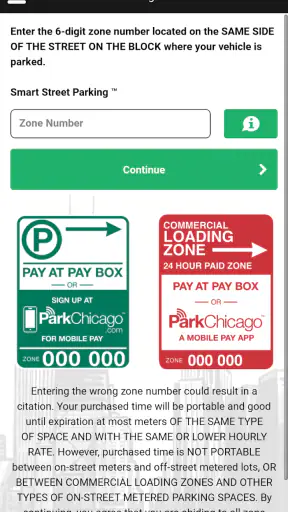
Imagine arriving downtown for an appointment with a few minutes to spare. You find a legal space, walk to the destination, and then realize the appointment may run longer than planned. With a traditional meter, that can mean guessing how much time to buy or interrupting the appointment to return outside. With ParkChicago®, I found the strongest use case is handling the parking task as part of the phone workflow: identify the relevant space, begin the session, and keep the details available while I am away from the car.
That does not make the app a substitute for reading signs. I would still inspect the posted restrictions, the street side, and any special conditions before walking away. The app helps with payment and session management; it does not turn a restricted space into a valid one. This is an important distinction because the convenience of a phone can make people less attentive to the physical street.
Another realistic use is a short evening errand when I do not want to carry change or stand at a meter in poor weather. The benefit is not dramatic, but it is cumulative. Removing the search for coins, reducing the need to return to the meter, and keeping the parking task on the same device I already use can make repeated city trips feel less fragmented.
Where the official app is strongest
The clearest advantage is focus. ParkChicago® is not trying to be a nationwide parking marketplace, a trip planner, or a broad navigation replacement. Its identity is tied to Chicago parking, and that makes the experience easier to understand when I am dealing with a supported city space. I do not have to sort through a long list of unrelated parking products before reaching the task I actually came to complete.
The official connection is also meaningful. Chicago Parking Meters, LLC. is the developer, so the app feels more appropriate for Chicago’s own parking environment than a generic app that happens to display nearby spaces. I would choose the official tool when my priority is handling the local parking process rather than comparing garages, hunting for restaurant parking, or planning a multi-city road trip.
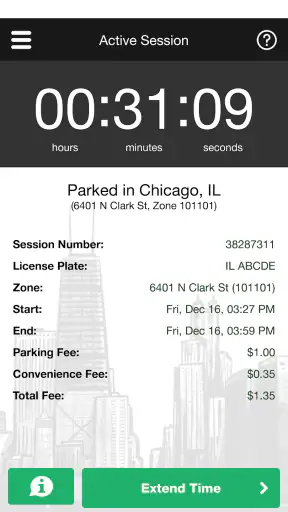
The phone-based workflow is particularly useful after I leave the car. A physical meter keeps the transaction at the curb. A dedicated mobile service moves part of the responsibility into a place I can revisit. That is a practical difference, not just a cosmetic one. It gives me a better chance of noticing the current session and making a considered decision when my plans change.
I also like that the app is free to download. That lowers the barrier for a regular Chicago driver who wants to try the official method without buying a separate parking device or committing to a broad subscription service. Free does not mean frictionless, though. I still need to spend time preparing the account and becoming comfortable with the process before relying on it during a rushed arrival.
Small habits that make it more dependable
My most useful habit was preparing before reaching the busiest part of the journey. I would open the app while parked safely or before leaving home, make sure I knew which vehicle I intended to use, and avoid treating the first live attempt as a tutorial. This is a simple change, but it matters because curbside parking leaves little room for experimentation.
I would also keep the physical signs as the final authority. Before starting a session, I would compare the app’s location context with the actual sign and meter area. This is especially important on a block where parking rules change by side, section, or time. A correct payment attached to the wrong space is still a bad outcome, so the app should support my observation rather than replace it.
A third useful habit is checking the active session immediately after payment. I would verify that the vehicle and location look right, then take a quick mental note of when the parking period should end. That extra moment is worthwhile because it catches mistakes while I am still near the car and gives me a clearer plan for the rest of the visit.
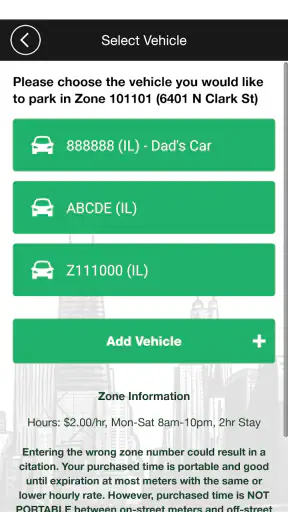
For people who share a car, I would be especially careful about selecting the correct vehicle before confirming anything. A household may use the same phone for more than one car, and a rushed tap can create confusion later. The app is most helpful when I treat the vehicle choice as a deliberate step instead of assuming the last-used option is always the right one.
Where other kinds of parking tools may fit better
The app is not the best answer to every parking question. If I am looking for a garage with a guaranteed space, comparing rates across facilities, or planning parking near an event, a garage-focused service may be more useful. Those tools are designed around inventory and pre-planning, while ParkChicago® is better suited to the immediate task of handling eligible street parking.
A general navigation app may also be preferable when the main challenge is reaching the destination. It can help with directions, traffic, and the broader journey, whereas this app has a much more specific role. I would use navigation for the route and the official parking app for the parking transaction rather than expecting one to replace the other.
Occasional visitors may reasonably prefer the simplest available method at the curb. If I am in Chicago once, do not expect to park again, and already have a fast way to pay at the location, installing and learning another app may feel like unnecessary preparation. The trade-off is that the traditional method can be less flexible once I walk away, so the better choice depends on whether convenience during the visit outweighs setup beforehand.
Drivers who regularly cross cities should also think about app clutter. A municipal parking app can be excellent in its home environment but less useful when a week of travel involves several different parking authorities. In that situation, I might prefer a broader parking service for discovery and keep the official app for Chicago trips where its local focus has a real advantage.
I would not recommend relying on it as a complete navigation solution. Its value is tied to parking, not to replacing turn-by-turn guidance or helping me understand every transportation option around a destination. That is not a flaw in its intended role, but it is an easy expectation to get wrong if I judge it as a general city-travel app.
What switching really costs
Moving from meters or another parking app to this one has a small learning cost. I need to install it, set up the payment process, become familiar with the location flow, and remember to start the session correctly each time. The first use may take longer than paying in a familiar way, particularly when I am already late or traffic behind me is impatient.
There is also a mental cost: I have to change my parking routine. Instead of treating the meter as the final step, I need to make the phone session part of the arrival sequence. I found that the transition became easier when I used the same order every time: park legally, read the sign, open the app, select the right vehicle and location, confirm the session, and check the result before walking away.
The payoff is strongest for repeat users. A person who parks in Chicago often can spread that learning effort over many trips and gain more from remote session management. A person who visits rarely may not receive the same return, especially if the curbside payment method is already familiar and the visit is too short to justify preparation.
Version 7.1.1 is the current version, and the app supports Android from version 4.4 onward. That broad compatibility is useful for people who keep an older Android phone as a daily device or backup, although I would still install and test it before an important trip rather than assuming every older handset will feel equally smooth. The app’s age rating is Everyone, which fits its straightforward practical purpose.
One limitation I felt is that no parking app can remove the need for attention at the curb. The phone may make payment easier, but I still have to identify the correct space, understand signs, watch the time, and return before the session ends when necessary. A user expecting the app to handle all parking decisions automatically will be disappointed. Its convenience comes from reducing steps, not eliminating responsibility.
My recommendation for Chicago drivers
I recommend ParkChicago® to anyone who regularly parks on supported Chicago streets and wants a focused way to manage payment from a phone. The free price, official developer, strong average rating, and large installed base make it an easy option to try, but the real reason to choose it is practical: it matches a local parking task more closely than a general map or a garage-discovery service.
I would install it before a busy trip, complete the setup in a calm moment, and use the sign-checking routine every time. That preparation is the difference between a useful tool and a source of last-minute distraction. I would also keep a backup payment approach in mind for the occasional situation where my phone, battery, connection, or account workflow is not cooperating.
For frequent Chicago street parking, the convenience is worth the small adjustment in routine. For a one-time visitor, a garage shopper, or someone who mainly needs directions, another category of app may fit better. My final view is therefore positive but specific: this is a good decision when the problem is managing Chicago street parking, not when the problem is parking everywhere or planning an entire journey.
My practical verdict: choose it if you want the official Chicago-focused parking workflow and are willing to prepare before arriving. Skip it if you rarely park in the city or need garage comparison and route planning more than curbside session management. Used for its actual purpose, it is a sensible, focused companion that can make ordinary Chicago parking less interruptive.


